If you’re using GetMoreRAM to increase the memory limit and suddenly run into the -80045 login error, you’re not alone. The issue can occur when the Anisette Server being used by the app isn’t working properly.
The good news is that you may not need to reinstall GetMoreRAM. Switching to another working Anisette Server can get the login process working again.
Why GetMoreRAM Shows -80045
The -80045 error can appear when GetMoreRAM has trouble communicating with its configured Anisette Server.
When the selected server isn’t working correctly, the app can fail during the Apple ID login process.
The solution is to change the Anisette Server and then try logging in again.
Fix -80045 With SideStore
If you installed GetMoreRAM using SideStoreSideStore, you can change the Anisette Server directly from SideStore’s settings.
1. Open SideStore
Launch SideStore on your device and open Settings.
2. Find Anisette Servers
Scroll down until you find the Anisette Servers option.
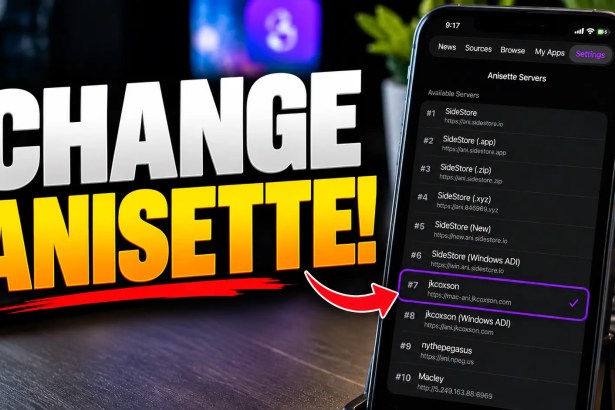
You’ll see a list of available Anisette Servers. The currently selected server is indicated by a check mark.
3. Copy a Server URL
Start with the default Anisette Server.
Copy its exact server URL and enter it into GetMoreRAM.
Make sure the URL is copied correctly. Even a small mistake can prevent the server from working.
4. Change the Server in GetMoreRAM
Open GetMoreRAM and replace the existing Anisette Server URL with the one you copied.
Once you’ve updated the server, force-close GetMoreRAM.
5. Try Logging In Again
Open GetMoreRAM and try signing in with your Apple ID and password.
If the selected Anisette Server is working properly, the login process should continue.
Still Getting -80045?
If you’re still seeing the -80045 error, go back to SideStore → Settings → Anisette Servers and try another server.
In the troubleshooting process shown in the video, another server, specifically a Mac server which works when the default server doesn’t.
Copy the new server URL, replace the existing Anisette Server in GetMoreRAM, and force-close the app again.
Then launch GetMoreRAM and try logging in once more.
Installed GetMoreRAM Without SideStore?
If you installed GetMoreRAM using another tool, the process is slightly different.
You may not have SideStore’s built-in Anisette Server list available. In that case, use the Anisette Server list provided below and copy one of the available server URLs.
Paste the URL into GetMoreRAM, make sure it’s entered correctly, and restart the app before trying to log in again.
Don’t Reinstall GetMoreRAM Immediately
Seeing the -80045 error doesn’t necessarily mean that GetMoreRAM needs to be reinstalled.
If the problem is caused by the selected Anisette Server, reinstalling the app may not solve the underlying issue.
Try changing the server first. It’s a much simpler troubleshooting step and may restore the login process without requiring a reinstall.
Frequently Asked Questions
What is GetMoreRAM error -80045?
-80045 is a login error that can occur when GetMoreRAM has trouble communicating with its configured Anisette Server.
How do I fix GetMoreRAM error -80045?
Try changing the configured Anisette Server to another available server, force-close GetMoreRAM, reopen it, and try logging in again.
Where can I find Anisette Servers?
If you installed GetMoreRAM through SideStore, open SideStore → Settings → Anisette Servers to see the available servers.
What if the default Anisette Server doesn’t work?
Try another server from the available list. The troubleshooting method demonstrated in the video shows that switching to another server can resolve the login problem.
Do I need to reinstall GetMoreRAM?
Not necessarily. Try changing the Anisette Server first. If the server is causing the login failure, this may resolve the problem without reinstalling the app.
Why am I being asked for a two-factor authentication code?
Once GetMoreRAM successfully communicates with a working Anisette Server, the Apple ID authentication process can continue. This can include the two-factor authentication prompt.